English
Deutsch
F A Q
Here are the answers to the most commom questions we receive from our customers. If you can not find here the answer to your particular question, please send us an email at: support@hexagon.de, and we will solve your problem as soon as possible.
Q: Text width in production drawing or diagrams is too large.
A: File->Settings->Graphics: Reduce text width coefficient, or select another text font.
F: I have added one record to the database. But the new record is not listed at input window.
A: End program and start again. Some input windows load lists from database at program start (performance reasons).
Q: How can I send result printout by email ?
A: Save as HTML file, then send the htm file as email attachment.
Q: How can I send graphic results (Quick chart, production drawing) by email ?
A: By means of a pdf file, we recommend. You have to install a PDF printer driver ( www.win2pdf.com, www.pdfmailer.com).
Then "File->Print", select pdf printer, enter file name, send pdf file as email attachment.
Q: How can I use graphice from HEXAGON software (Quick view, diagrams, drawings..) with my documentation software?
A: By cWindows clipboard: Use keys "Alt"-"Print" to copy graphic screen to Windows clipboard. Then run your documentation software (MS-Word, StarOffice, Corel Draw...),
insert graphic at "Edit->Paste" or by "Ctrl-V" keys. If high precision is required, better generate DXF file at "CAD" menu, then import dxf drawing into your documentation.
Q: At production drawing, report of changes should be indexed by 1,2,3.. instead of letters a,b,c...
A: Goto File->Settings->CAD, select Index 1,2,3, then save changes.
Q: At the production drawing of FED1+ there is no cross for some quality grades even if I selected one.
A: At "Edit->Tolerances" you can define compensation of production. Dimensions selected for production compensation cannot be tolerated.
Q: Production drawing should contain our company logo.
A: This is possible. See manual chapter "Documentation" for description.
Q: I tried without success to add our company logo to the production drawing.
A: Please check:
- file "$LOGO_1.DX$" exist in temporary directory ? (File->Settings->Directories)
- is file "$LOGO_1.DX$" write-protected ? (file attribute Read/Only)
- did you modify DXF file exactly how it is described in manual ?
Q: We use FED1+ as Floating network license. One of the users got this error message:
Error # 32 ( error at common file access )
cannot open i:\hexagon2\FEDWST.@s@ action = login [Database Semaphore]
A:Problem with Novell client:
Novell client 4.8 causes problems with temporary database files from write-protected dbf directory under Windows 2000 and Windows XP.
Install the older Netware client 4.7, and the programs runs without errors.
Q: Error message at network version: Could not create index file.
A: Error message comes from database, index file could not be created on temporary directory.
Probably another user configured the same temporary directory, and works just now also with the program.
Remedy:
- Every user must define his own temporary directory, better use local harddisk.
- Every user must define his own working directory (at Windows Shortcut), because cfg file is loaded from this directory.
- Users should get no write access for database directory.
Q: Some input windows appear with scroll bars.
A: If you use XP standard frames, set window size to 102% at File->Settings->Graphics.
Q: How can I sort material database to tensile strength ?
A: Click with right mouse key into title field to be sorted (RM). Index function is available in all databases.
Q: Compatibility of old input files
We have been using the software over many years now, and have quite a collection of input data stored from previous projects. When
updating the software, will it be necessary to update any of the input files in any way? If not, can you briefly explain how
compatibility is maintained between versions? Are there any installation instructions specifically for upgrading?
A: Old files can be opened in new versions without any modification.
Q: Library functions
As you know engineering is often about trying to find the "optimum" solution among many possible. This often leads to multiple
calculations with a large range of different input conditions. Are there any established techniques to use this software in such a
way?
A:
1. File open (Table) loads different input files and generates table with results. You can compare results and export table into Excel.
2. Command line mode to run HEXAGON software by external programs, see short description in chapter "OLE Object linking"
Q: When updating the installation (floating license on a fileserver), can you just install to the same shared directory as the
previous installation was in? Or do you recommend a fresh installation to a new directory.
A: It should be installed in the same directory. Just overwrite old files with same file name.
Q: To export in DXF format is required a license or separate module? What is the function of modules DXF-Manager and DXFPLOT?
A: DXF and IGES export function is included in the software, no extra module or license required.
DXFPLOT generates true-scale drawings on HPGL Laserprinters.
DXF-Manager converts DXF files into other formats (IGES, HPGL, Postscript, CNC-Code...)
Q: I am having problem with opening my already saved bolt calculation files (090309_shank_M14x1.5.sr1).
A: Dots (.) in file name not allowed (only one "." that separates file name and file extension). Rename "." into "_".
Q: After 2 program starts I get error messages like "error #2 (file not found). Cannot open FEDWSTR.@S@ LOGIN“ or „error #5 (file access denied). Cannot
open FEDWSTR.@S@ LOGIN“, sometimes followed by errors „property visible cannot be changed to OnShow or OnHide“.
A1: File access errors can occur, if you installed software as Admin, then run the program as user with restricted rights. Because users are not allowed to modify or erase files created by the Admin.
A2: Another reason is the Virus scanner „Kaspersky Antivirus 2010“. You must allow all file access operation to HEXAGON software. Settings
Q: I got a problem while using software on my Chinese Windows, messy code always appears in the process, could you help figure it out?
A: Goto File->Settings. At "Printout", Select Linetype **** or blanks or compressed. Or select another font.
At "Settings", change "special characters" to "2 u deg". Then save new configuration.
Q: When the user uses Hexagon Standard and Excerpt printout options,Can't display English or German - unreadable code,Our two users both have this problem . Can you tell me the reason and How to solved it?
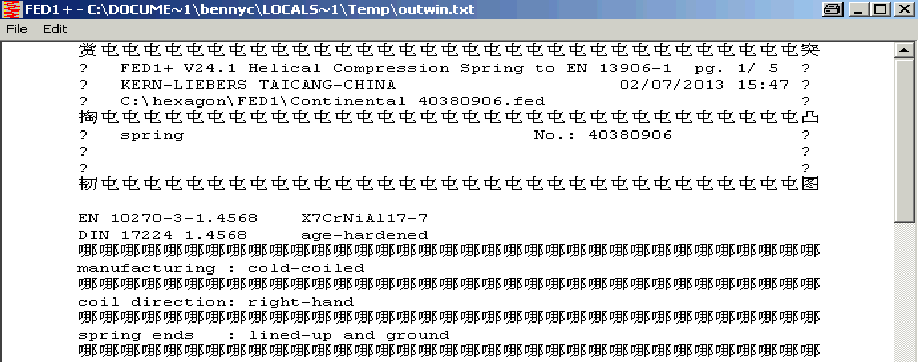 A: Goto "File->Settings->Printout", Select Linetype: try another setting. Then save new configuration.
Q: SR1: Can you tell me if SR1 software calculates the "Plate Resilience" using the "cone and sleeve method", similar to VDI-2230 (2003)?
A: Formulas in VDI 2230:2003 are applicable for ESV with 1 clamping plate and for DSV with 2 clamping plates only. Therefore, SR1 uses the more common formulas according to VDI2230:1986. See also Schrauben-Vademecum and attachment. Since SR1+ V19.1, you can set option to calculate plate resilience using "cone and sleeve method" according to VDI 2230-1:2015..
Q: Command line mode: I started to use your HEXAGON S/W recently. I have developed our own robot design program. So I’m trying to interface between our own S/W and HEXAGON for synergic effects. Thankfully, HEXAGON already serves related functions. I’m using ‘Command Line Mode’ for ZAR1 and I get the XXX.txt as a result file. What I want to know is the method of changing format of output file in command line mode (Decimal sign for metric, and I don’t want header at every line). What I tried is to execute ZAR1 as GUI Mode and set the related parameters in File-Setting menu. But it didn’t work. So I give my question to you: What should I do for changing the output format in command line mode of ZAR1?
A: In command line mode, ZAR1 cannot find ZAR1.CFG in working directory. If ZAR1.CFG not found, ZAR1 tries to load from C:\HEXAGON. Copy ZAR1.CFG from working directory into C:\HEXAGON\ZAR1.CFG so that settings can be loaded.
Q: How can I avoid that our network version accesses the network during application of the program ?
A: After loading the program into memory, it needs file access for network files and help files only. To avoid this, you can copy dbf files on a local disk.
File->Settings->Directories:
1. Temporary folder must be local! If temp directory configured to network drive, this only slows down application and network.
2. Configure folder for database files as local directory, if you want to avoid network access during application. Attention data integrity: update database files automatically.
Q: Network printer problem: Instead of the printer dialogue window, we get a message „There is no default printer currently seleceted“.
A: This problem may occur, if the default printer is a network printer which was installed on the network server. In this case, re-install the default network printer on your workstation using local printer drivers. Or simply select a local printer or pdf printer as default printer.
Q: ZAR1+: We have 1 problem at key-in our gear data for gear analysis in ZAR1+. When profile shift coefficient x1+x2 does not equal to the theoretically calculated sum of profile shift coefficient(x1+x2), we can not use the Hexagon program. When we key-in x1 and x2, the program gives calculated center distance to us automatically. The automatically calculated center distance does not equal to our center distance of our gear data. In this case, what can I do in using your Hexagon program ?
A: Profile shift of a measured gear is "xe", not "x". Calculated center distance is without clearance in this case. Goto "Edit->Dimensions" and input center distance a. Next go to "Edit->Quality" and click "^" below Asne, then "Asne<->xe", then exter "xemax" and "xemin". If tolerance unknown, enter equal value for xemin and xemax.
Q: Gearbox: Do you have an example application for calculation of gears and shafts in a gearbox with WL1+ and ZAR1+?
A: Download gearbox1.zip with WL1 and ZAR1 files.
Q: FED1+: What means Fn' in Load-deflection diagram ?
A: Fn' is the load with shear stress taun' = tauz (permissible). Only for springs with shear stress at block length (tauc) higher than permissible shear stress (tauz).
Q: I noticed that in the settings in SR1 there is an option to copy DBF ->TEMP, is it still necessary to set the permissions to the database directory to read only?
A: If you set this option, it is not necessary to set read only permissions to database directory.
E-Mail |
FAQ |
Zurück